

DEPOSITS AND WITHDRAWALS
Low deposit fees.
Fast Withdrawals.
Bank Transfers.
Take control of your financial future.
DEPOSITS ON BITFINEX
Explore Deposit options
Buy or deposit crypto instantly. You can use a bank card, make a wire transfer or use a stablecoin - you decide. Bitfinex makes it simple.

Credit/Debit Card
Accepting USD, EUR, GBP, JPY, and TRY

Bank Transfer
Accepting EUR, USD, GBP, and JPY

Crypto
Deposit over 200+ supported digital assets

Tether Tokens
USDt, EURt, CNHt, XAUt, MXNt
Available across 11+ blockchains
Fiat deposits in EUR and GBP available with no minimum or maximum deposit amount.
Use the Lightning Network for
instant transfers
Deposit and withdraw fiat
Bitfinex supports fiat currency withdrawals in USD, EUR, GBP, and JPY.
Stay in control with our technology


How to make fiat deposits on Bitfinex


STEP 1
On Bitfinex.com, go to the Wallet page > Deposits > Bank transfer and choose from Euro, Yen, Pound Sterling or US Dollars.

STEP 2
Select the wallet and the deposit amount.


STEP 4
Select the country of your bank and accept the terms.

STEP 5
You will receive the wire recipient information, which you will need to wire your funds to complete the deposit.
That's it! Learn more here.
How to make wire withdrawals on Bitfinex
STEP 1
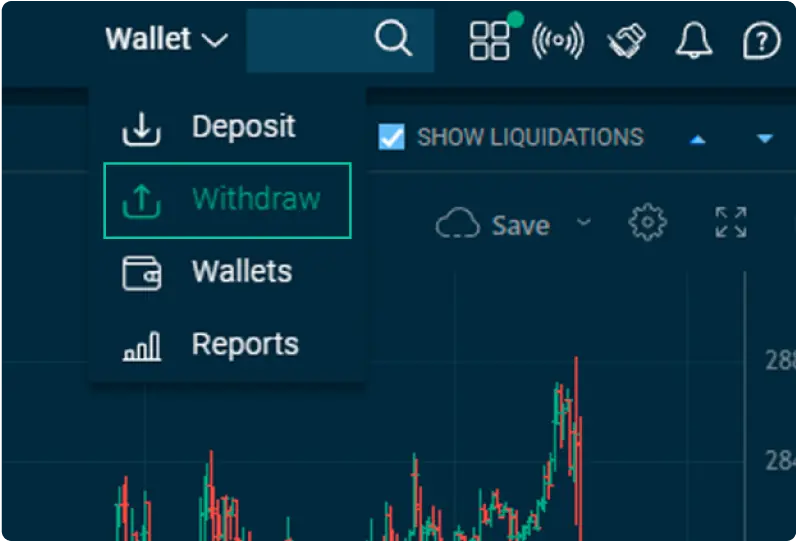
On Bitfinex.com, go to the Wallet page > Withdrawals > Bank transfer.

STEP 2
Choose the currency you wish to withdraw. For fast Euro or Pound Sterling withdrawals, consider OpenPayd, a Banking-as-a-Service infrastructure providing instant wire withdrawal services for accounts with Intermediate and higher verification levels.
For withdrawals of US Dollars, see choices here.

STEP 3
Fill in the information about your beneficiary bank.

STEP 4
Next, enter your 2FA code to confirm you wish to proceed with the withdrawal.

STEP 5
To finish, confirm the transaction via email, and your withdrawal will begin processing immediately. Learn more here.
Deposit and withdraw
crypto and fiat
on the Bitfinex Mobile App
Stay in control. Backed by our professional tools.
The Bitfinex mobile app allows seamless ‘on-the-go’ transfers.


How to deposit with the Bitfinex Mobile App

STEP 1
Open the Bitfinex Mobile App and tap the Wallet tab on the bottom menu. From there, tap Deposit to proceed.
Note: If you're logged in with an API key, please ensure that deposit permissions are enabled. See How to log in to the Bitfinex Mobile App for more information.
STEP 2
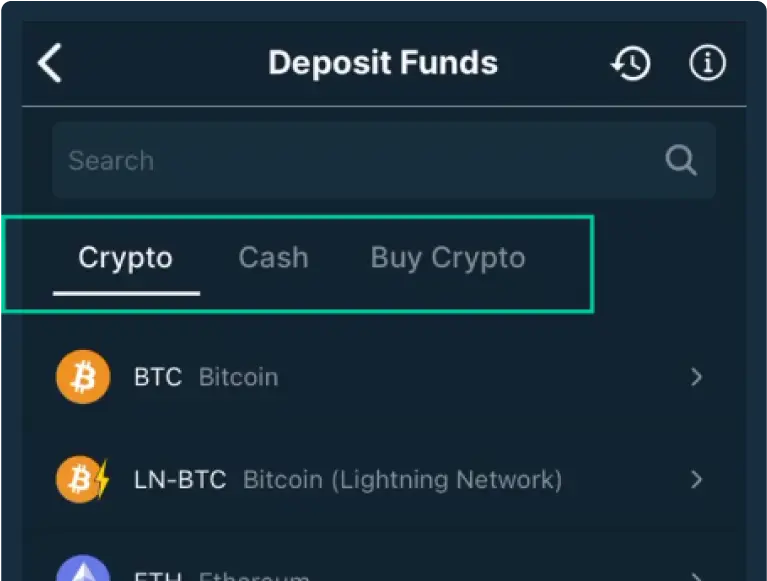
Select the type of deposit you wish to make.
Crypto: Here, you will find all the cryptocurrencies and stablecoins supported by Bitfinex. Clicking on a token will automatically generate a deposit address, which you can either click to copy or scan.
Cash: Bitfinex-supported fiat deposits require creating a Deposit Notification. After selecting this option, you will be guided to fill in the required information on the Bitfinex Mobile App.
For more details on how to make a deposit or buy crypto using the Bitfinex Mobile App, click here.
How to withdraw with the Bitfinex Mobile App

STEP 1
Firstly, open your Bitfinex Mobile App and go to your Account page. Select Account > Permissions to view your API key permissions and ensure you have “Create a new withdrawal” permission enabled.

STEP 2
If your account does not have the permission enabled, you can enable it directly on the Mobile App by tapping on it to turn it on. You can also create a new API key and enable permissions through the website. Learn more on how to do it here.
STEP 3
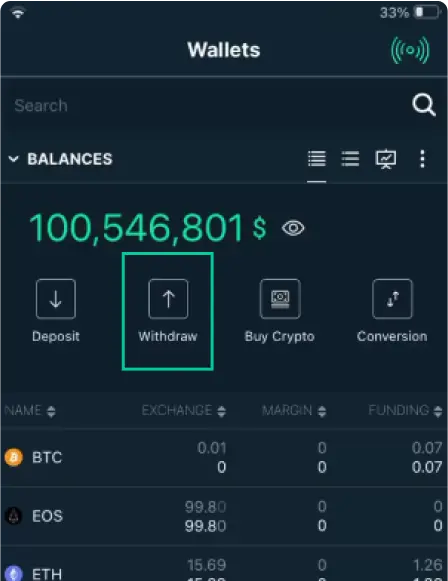
Once you have enabled permissions, go to the Wallets screen. Here, you will find the Withdraw option.

STEP 4
Select if you want to withdraw cryptocurrencies or fiat/cash using bank wires.
Crypto: Select the token you want to withdraw, then enter the destination address, amount, and select the Wallet from which you want to withdraw. Learn more about Bitfinex wallets here.
Cash: Select the fiat currency you want to withdraw, then enter the amount, and select the Wallet from which you want to withdraw.
Learn more about our app
Deposit and withdrawal status

Currency  | Status | |
|---|---|---|
Frequently Asked Questions (FAQ)
What are the deposit fees at Bitfinex?
- For cryptocurrency deposits to Bitfinex, there are no additional fees.
- For bank deposits such as USD, JPY, EUR and GBP, the fee is 0.1%, with a minimum fee of $60.
- For fiat deposits of EUR and GBP with OpenPayd, the fee is €5 / £5 per transaction.
For a detailed overview of the deposit fees, please visit our Fees page.
What are the minimum fiat deposits at Bitfinex?
- 10,000 for USD/EUR/GBP;
- 1,000,000 for JPY;
Note: When using the third-party service provider OpenPayd for your Euro/Pound Sterling transfers, there is no minimum or maximum deposit amount. There is, however, a €25/£25 minimum withdrawal amount with a transfer fee of €5/£5 per transaction for withdrawals of 10,000 EUR/GBP or less.
Important: For withdrawals of more than 10,000 EUR/GBP via OpenPayd, a fee of 0.1% of the amount of your withdrawal is charged.
Is there a minimum for cryptocurrency withdrawals?
Is there a minimum for fiat withdrawals?
Note: There is a €/£25 minimum amount when using the third-party service provider OpenPayd for your Euro and Pound Sterling transfers and the minimum verification level required is Intermediate.
How long does it take for a cryptocurrency withdrawal to be processed on Bitfinex?
At times, withdrawals can take up to 12 hours to process fully. We always do our very best to have your withdrawals sent to the blockchain as fast as possible; however, we cannot guarantee instant withdrawals.
Learn more on how to get faster withdrawals here.
When will my fiat deposit arrive in my Bitfinex account?
Wire EUR and GBP transfers powered by OpenPayd take up to two hours to be credited.
Why has my deposit not been credited immediately?
- To make a withdrawal from the third-party platform, after which the transaction will be broadcasted onto the blockchain;
- To acquire the required number of blockchain confirmations;
- To credit the funds to your account once the necessary amount of confirmations has been met.
While your withdrawal may show as Confirmed or Successful on the third-party platform, it will need to reach a number of confirmations to be credited to your Bitfinex account.
Where is my cryptocurrency deposit or withdrawal?
Why was my withdrawal cancelled?
- Not confirming the withdrawal request received via email
- Withdrawal hold
- Negative balance
- The wrong address
Learn more about the reasons for withdrawal cancellation at Bitfinex here.
When will the funds arrive in my bank account?
An Express bank wire withdrawal is sent out from Bitfinex within one business day and incurs a 1% processing fee. Important: The stated timeframe may be subject to delays due to the recipient institution's processing times. Bitfinex cannot guarantee that the receiving entity will process your withdrawal within a certain time frame because the receiving entity will have its own procedures and processing delays.
Why are there delays in fiat withdrawals?
Even though we cannot give an exact timeframe for when a wire withdrawal will be completed, the approximate time it takes to withdraw fiat currencies from our platform is seven business days. However, it is not unusual for transactions to take up to 15 business days in order to comply with proper AML/KYC procedures.